Site Map Layout
The layout of the units on the site map in DomicoCloud must be set by hand.
From the home screen, click Unit Map:
All units are grouped in the middle of the map by default. If your units do not appear to match their actual dimensions, please contact Domico Support.
To begin moving units around, click Change Layout... in the top left:
Change Layout... will also change to Block Layout... when in Edit Mode.
"Save Changes" is in the lower right corner - we strongly recommend saving often while building!
When the map is in Edit Mode, the units will have little white "doors" appear on them:
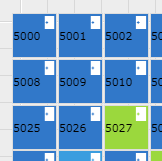
If your facility has multiple levels/floors, you can have separate maps for each. Be sure to save your changes before moving units to another floor! The map will jump to the new floor, and you will lose any unsaved changes. With the map in Edit Mode, click the white "door" on the unit and select another level/floor.